


Markup R-XP
4.688.00 Reviews
App Specs
- Version
- 0.8.24108.44003
- Updated On
- License
- Free
- Downloads
- 10,000+
- Developer
- Kewin Lawson Smith Limited
- Categories
- Art & Design
- Platform
- Android
Screenshots
 Analysis by AppCompare
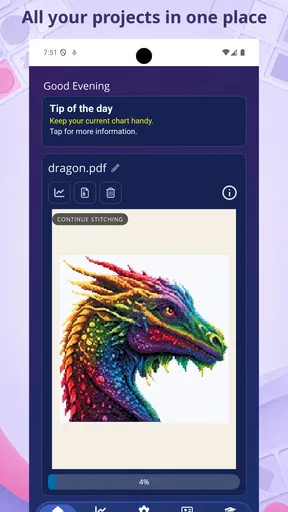
When I’m deciding whether a specialist chart tool is worth adding to my phone, I start with the files I actually need to mark up. Markup R-XP is aimed at stitchers who work from PDF charts, pictures, or photos of paper charts, so its appeal is less about general document editing and more about keeping a needlework pattern usable while I work. If that is the problem you want to solve, it is a more relevant starting point than a general-purpose notes app.
Choose by the chart you work from
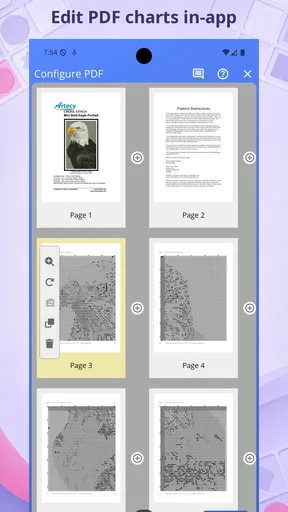
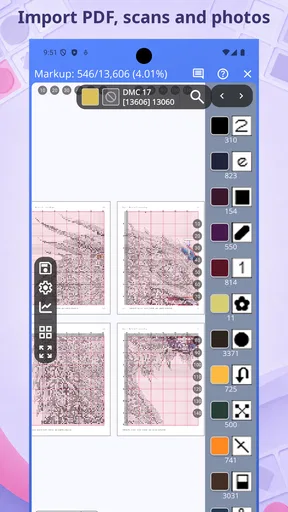
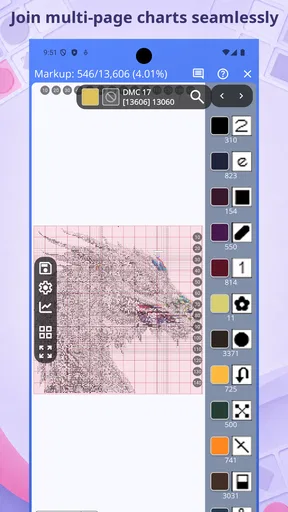
The first question I would ask is whether your patterns are already digital or whether you often work from paper. A PDF chart gives you a tidy source file; a photo of a printed page may be less uniform, but it can still be useful when you want to take a pattern with you without carrying the original. Having both kinds of source in scope makes this app worth considering for stitchers whose patterns come from different places.
That focus also sets a sensible boundary. If your main goal is writing notes on office documents, sketching freely, or managing a broad collection of files, a general PDF reader, drawing app, or note-taking tool may be a more natural fit. I would choose a dedicated stitch-markup app when the chart itself is the center of the task, rather than expecting it to replace every document tool on my device.
Where a chart-focused workflow helps
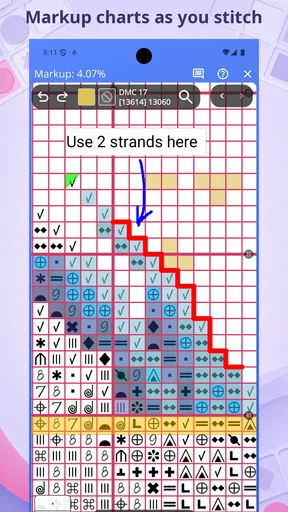
For a stitching session, the useful question is not simply whether an app can display a page. It is whether I can keep my place and add marks that make sense to me as I work. The app’s chart-and-image focus points toward that practical routine: open the pattern I need, make the relevant marks, and return to it later without treating the chart as an ordinary reading document.
A small but helpful habit is to mark only what will guide the next part of the session. For example, I might use a clear, consistent mark for completed work and a different kind of note for a section I want to check before continuing. That keeps the page readable instead of turning every symbol into a tangle of annotations. The exact method is personal, but deciding on a simple marking convention before starting can make any chart markup easier to interpret later.
A realistic project-day test
Picture taking a pattern to a waiting room or setting it beside your work at home. You have a PDF for one project and a phone photo of a paper chart for another. In that situation, a tool intended for both charts and pictures may spare you from switching between a PDF reader for one file and a separate image annotator for the other. The benefit is not magic automation; it is having a workflow centered on the kind of reference you are using.
I would still prepare the files before settling in. Make sure the chart image is clear enough to read, keep the original pattern unchanged if you may need a clean copy, and avoid adding so many marks that the printed symbols become hard to distinguish. A phone screen can be convenient for checking a section, but tiny chart details may be easier to inspect on a larger display or on paper. The right choice depends on the pattern’s legibility and how you like to stitch.
Worth Reading Before You Choose

Baby Panda World Brings Quick Play to Modern Phones, but Its Game Library Feels Busy

ESPN’s Live Game View Makes Following Close Games Easier

QuizzLand Review: A Good Fit for Short Trivia Breaks, Not Every Player

Basketball Stars: Multiplayer Is Fast, but Can It Recover When Matches Go Wrong?

WEBTOON Turns Phone Updates Into a Better Reading Routine

Link to Windows Runs on Shared Habits, Not Social Feeds
How it differs from everyday alternatives
A standard PDF reader is often enough if you only need to open a digital pattern and do not expect a stitch-oriented workflow. A general image editor may suit someone who primarily works from photographs and wants broad picture-editing tools. A paper chart remains a straightforward option for anyone who prefers a physical page and does not need digital marks. Those alternatives are not inferior by default; they simply solve different problems.
Where this app makes the stronger case is for someone who regularly moves between chart PDFs and pictures of charts and wants a tool chosen for that kind of material. I would not assume that the specialized focus automatically makes every task faster, though. If you only mark a pattern occasionally, learning a separate app may add more friction than it removes. If chart markup is part of your regular routine, the narrower focus is more likely to feel worthwhile.
Getting comfortable without cluttering a pattern
When trying a new markup workflow, I recommend testing it on a small or familiar section before relying on it for a long project. That gives you a chance to see whether your marks remain easy to read alongside the chart symbols and whether your preferred way of tracking progress feels natural. It is a low-stakes way to establish a personal system before a busy pattern page is covered in notes.
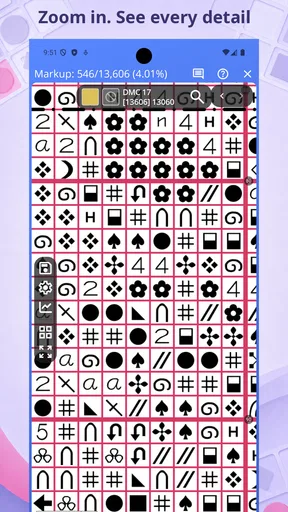
Another useful trade-off is screen space. Zooming in can make a dense area easier to inspect, but it can also hide the surrounding chart context. I would alternate between close inspection and a wider view rather than working at one zoom level throughout. That simple habit helps me avoid losing track of where a small marked area sits in the overall pattern.
It is also worth thinking about file organization before a project grows. Keeping a clean source chart separate from a working copy, where possible, gives you a fallback if you later want to restart or change your marking approach. This is especially practical when a pattern comes from a photograph: retaining an untouched version lets you revisit the original image if your annotations become visually busy.
First Impressions
Jumping into the app, I was immediately struck by its sleek and intuitive interface. It’s one of those apps that doesn’t make you feel like you need a PhD to navigate through the features. Everything is where you’d expect it to be, which is a big win in my book. You can tell the developers put a lot of thought into user experience.
Features That Stand Out
Now, let’s talk features. This app is jam-packed with tools designed to make your life easier. You can annotate, highlight, and even collaborate on documents in real-time. Imagine working on a project with a team scattered across different time zones, and everyone can chime in with comments and edits. Pretty cool, right?
One feature I found particularly useful is the smart highlighting. It’s almost like the app reads your mind, knowing exactly what needs to be emphasized. And if you’re a bit of a perfectionist like me, the drawing tools will be your new best friend. They’re precise and responsive, making it a breeze to add personal touches to your documents.
User Experience
Let’s dive into the nitty-gritty of the user experience. I found the app to be lightning fast, with no annoying lags or crashes. Switching between documents and tools is seamless, which is crucial when you’re in the zone and don’t want to break your flow.
Another aspect worth mentioning is the app’s compatibility. Whether you’re on Android or iOS, it has you covered. The syncing across devices is smooth, ensuring you have your most recent updates wherever you go. Trust me, there’s nothing more frustrating than losing your work because of poor syncing.
Integrations and Customizations
For those who love to personalize their tools, this app doesn’t disappoint. It offers a variety of customization options. You can tweak the look and feel to suit your style, which I find makes the experience more enjoyable and personal.
On the integration front, the app plays well with others. It connects with popular cloud services, so you can easily import and export documents. This means no more jumping through hoops to get your files where they need to be. Just a simple tap and you’re set.
Room for Improvement
While I’m singing praises, it’s worth noting there are a couple of areas where the app could improve. The learning curve, while not steep, may take a bit of getting used to for complete newbies. A built-in tutorial or user guide could be a nice touch for those just starting out.
Also, while the app is generally reliable, I did encounter a few minor bugs. Nothing deal-breaking, but a couple of hiccups when switching between tools. I’m hopeful these will be ironed out in future updates.
Who should make the switch?
I would recommend trying it if you stitch from digital charts often, especially when your references include both PDFs and chart images. It is also a reasonable option for someone who wants to carry a working reference on a phone instead of relying exclusively on a paper copy. The developer is Kewin Lawson Smith Limited, and the app sits in the art and design space rather than presenting itself as a general office suite.
On the other hand, I would skip it if you rarely annotate patterns, strongly prefer a printed chart, or need a broad-purpose PDF editor for work and study. A specialist app is most useful when its specialty matches a repeated task. Before moving a whole pattern collection into a new routine, I’d test one chart that you know well and see whether the marking process actually feels easier than your current method.
Price, platform, and the commitment involved
The app is free to download, with in-app purchases listed at $10.99 to $17.99 per item. I would treat the free entry point as a chance to judge whether the chart workflow suits you, then consider any purchase only after identifying a specific need. Since those purchases are separate from the initial download, check what is included in the option you are considering rather than assuming every tool or capability comes at no cost.
It is rated for Everyone and has an average rating of 4.6 from 651 ratings, with 86 written reviews and more than 10K installs. Those figures suggest that other people have tried it, but they cannot tell me whether it will match my own chart habits. It was released on May 22, 2021, and version 0.8.24108.44003 requires Android 5.1 or later. If you use more than one platform, check the version and availability on the device you plan to use before building a routine around it.
Switching has a small but real cost even when an app is free: you have to learn its controls, decide how to organize working charts, and possibly adjust habits built around paper or another viewer. I would keep a clean copy of important patterns and move over one active project first. That way, if the new approach does not suit you, you can return to your old method without losing a familiar reference.
Final Thoughts
All in all, this is a powerhouse of an app that delivers on its promises. It’s a fantastic tool for anyone looking to boost productivity and streamline their workflow. With its robust features and user-friendly design, it’s definitely worth checking out. Whether you’re a student, professional, or just someone who loves to stay organized, this app has something for everyone.
So, if you’re ready to take your document management to the next level, give Markup R-XP a try. I’m confident you’ll find it as useful and delightful as I did.
Pros
- User-friendly interface enhances experience.
- Wide range of customization options.
- Regular updates with new features.
- Efficient performance on low-end devices.
- Strong community support and resources.
Cons
- Limited offline functionality.
- Occasional ads can be intrusive.
- Some features require in-app purchases.
- Learning curve for advanced tools.
- Compatibility issues on older OS versions.
FAQs for Markup R-XP
What is Markup R-XP, and how does it enhance my productivity?
Markup R-XP is a productivity app designed to streamline your workflow by allowing you to annotate, highlight, and comment on various document types. It supports PDFs, images, and text files, making it ideal for professionals and students who need to mark up documents efficiently. Its intuitive interface and comprehensive toolkit help enhance productivity by simplifying document review and collaboration.
Does Markup R-XP support cloud integration and syncing across devices?
Yes, Markup R-XP offers seamless cloud integration, allowing you to sync your documents and annotations across multiple devices. It supports popular cloud services like Google Drive, Dropbox, and OneDrive, ensuring your work is always accessible and up-to-date regardless of the device you're using. This feature is particularly beneficial for users who work on-the-go.
Is Markup R-XP available for both Android and iOS platforms?
Markup R-XP is available for both Android and iOS devices, ensuring compatibility with a wide range of smartphones and tablets. The app is optimized for each platform, providing a smooth and responsive user experience, whether you are using an Android device or an iPhone. This cross-platform availability makes it a versatile tool for diverse users.
Are there any in-app purchases or subscription fees associated with Markup R-XP?
Markup R-XP offers a free version with basic features, but to unlock its full potential, users can opt for in-app purchases or a subscription plan. These options provide access to advanced tools and additional cloud storage. Pricing is competitive, and users can choose a plan that best suits their needs, whether they require occasional use or extensive functionality.
How user-friendly is Markup R-XP for beginners?
Markup R-XP is designed with user-friendliness in mind, making it accessible for beginners. The app features a straightforward interface with intuitive navigation, allowing users to quickly learn and utilize its functions without a steep learning curve. Additionally, helpful tutorials and customer support are available to assist users in maximizing their experience with the app.


